Follow us:

Neon Grid Showdown

Arcade Retro Multiplayer
Neon Grid Showdown

Reviews

Neon Grid Showdown succeeds by keeping things simple. The core loop of selecting a character, entering an arena, and competing in fast rounds is executed well. The arenas are small but cleverly designed, forcing players to think about positioning. The pixel-art visuals are clean and help maintain clarity during hectic moments. While it lacks online features, the game delivers exactly what it promises: a solid, competitive local multiplayer experience for two players. It is a great choice for game nights or quick sessions.

About this game

Core Competition

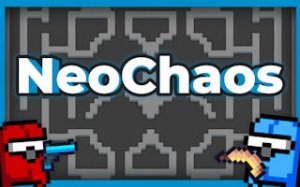
Neon Grid Showdown is built around direct, face-to-face matches. There are no online lobbies or complicated menus. Players pick up a controller and jump straight into a contest. Each round is a test of quick thinking and spatial awareness, as opponents try to land more hits while avoiding incoming attacks. The pace is brisk, making every second count.

Character Selection

Before each match, players choose from a small roster of fighters. Each character brings a different set of abilities to the arena. Some may move faster, while others have attacks that cover more area. This variety encourages players to experiment and find a style that fits their approach. Understanding each character's strengths is key to gaining an edge.

Arena Design

The battlegrounds are tight, enclosed spaces with geometric structures that offer cover and strategic options. These arenas are not just backdrops; they actively shape the flow of each match. Players can use walls and obstacles to block incoming fire, set up ambushes, or create escape routes. Mastering the layout of each arena is as important as mastering your character.

Visual Style

The game uses a pixel-art aesthetic that recalls classic arcade titles. The neon color palette gives the arenas a futuristic feel while keeping the visuals clear and readable during fast action. This art style is not just nostalgic; it ensures that players can easily track their character and opponent even during intense exchanges.

Match Flow

Matches are designed to be short and decisive. After a round ends, players can immediately start a rematch with the same characters or switch things up. This quick turnaround keeps the energy high and makes it easy to play for just a few minutes or settle in for a longer session. The focus remains on the competition, not on waiting.
Compatibility

▸ Desktop: Chrome / Edge / Firefox / Safari
▸ Mobile: iOS Safari / Android Chrome
▸ Tablet: iPadOS Safari / Android Tablet Browser
Keep your browser updated for the best experience

Advertisement

Faq

Does Neon Grid Showdown support more than two players?
No, the game is specifically designed for two players. It focuses entirely on one-on-one local competition. There are no options for additional players or teams in the current version.
Can I play Neon Grid Showdown alone against a computer opponent?
The game is built for two human players. It does not include AI opponents or a single-player mode. You will need a friend or family member to play against.
What platforms is Neon Grid Showdown available on?
The game is primarily available on PC. It may also be found on certain console platforms that support local multiplayer. Check the official store page for the most accurate platform list.
How many characters are in Neon Grid Showdown?
The game includes a small roster of distinct characters. The exact number is not specified, but each character has unique abilities that change how matches play out. This keeps the selection process meaningful.
Is there any online matchmaking or leaderboard in Neon Grid Showdown?
No, the game does not feature online matchmaking or leaderboards. All matches are played locally. The focus is on direct, personal competition without any internet connection required.
What kind of controller do I need for Neon Grid Showdown?
The game supports standard game controllers that are compatible with your platform. Two controllers are required for two-player matches. Keyboard and mouse may also work depending on the version.

Comments

0 comments
U
User
Loading comments...